
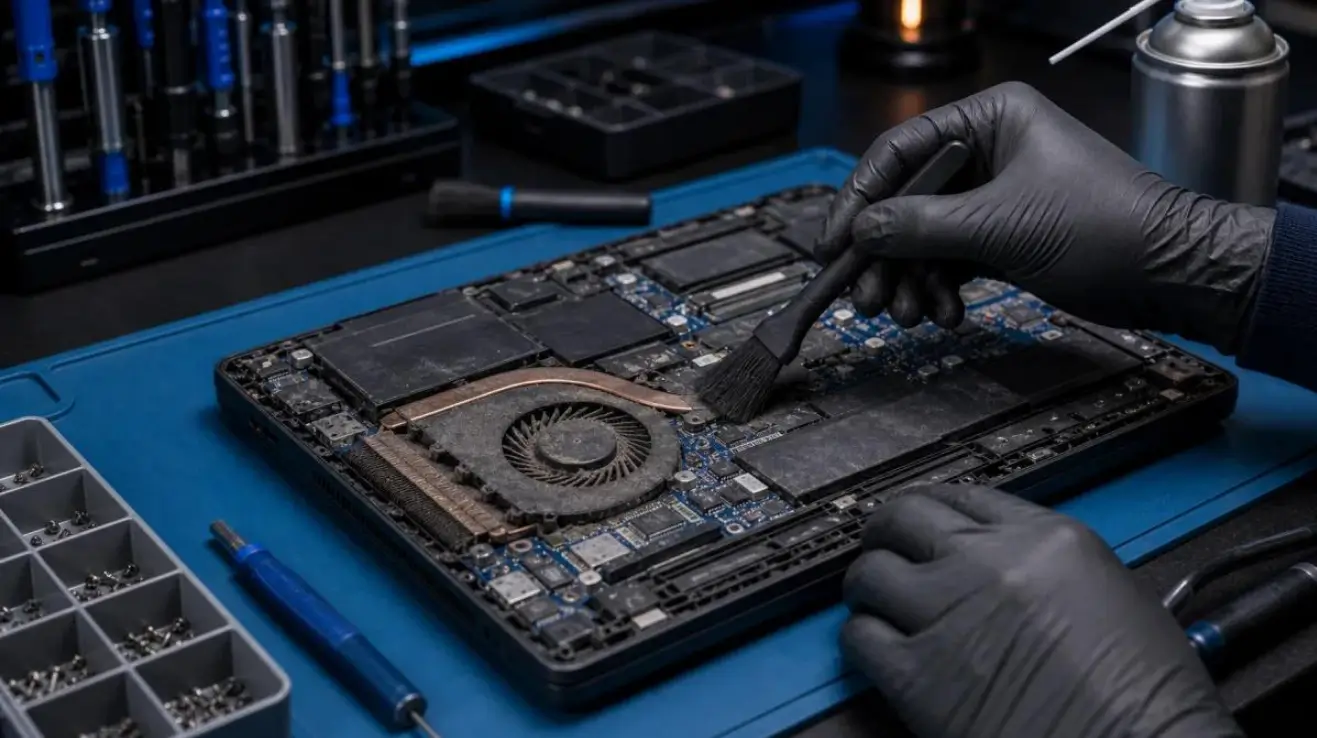
Is your laptop becoming unusually hot, making loud fan noises, or shutting down unexpectedly? Laptop overheating is a common problem that can affect device performance, battery life, and long-term reliability. Whether you use your laptop for work, education, gaming, or everyday browsing, excessive heat can interrupt your activities and potentially damage internal components
Understanding why your laptop overheats and knowing when to seek professional assistance can help you avoid expensive repairs.
At FixMyPC, we provide professional laptop repair services in Kilcock, Maynooth, Kildare, and surrounding areas, helping customers diagnose overheating problems, cooling system faults, and other hardware-related issues.
What Causes a Laptop to Overheat?
Laptops generate heat during normal operation, especially when running demanding applications. However, excessive temperatures may indicate a cooling problem or another underlying issue.
Here are some common causes of laptop overheating.
1. Dust and Dirt Blocking Air Vents
Over time, dust, dirt, and debris can accumulate inside your laptop, restricting airflow and preventing heat from escaping efficiently.
When ventilation becomes blocked, internal temperatures increase, causing cooling fans to work harder.
Common warning signs include:
- Excessive heat around the keyboard or underside
- Loud or constantly running cooling fans
- Reduced laptop performance
- Unexpected shutdowns
Professional internal cleaning can help restore airflow and improve cooling efficiency.
2. Faulty or Damaged Cooling Fans
Your laptop’s cooling fan plays an important role in regulating internal temperatures. If the fan becomes damaged, stops working, or struggles to rotate properly, heat may build up quickly.
A faulty cooling fan can cause overheating even when the laptop is performing simple tasks.
If you notice unusual grinding sounds, inconsistent fan operation, or frequent shutdowns, a professional technician can inspect the cooling system and determine whether fan repair or replacement is necessary.
3. Dried or Deteriorated Thermal Paste
Thermal paste helps transfer heat from the processor to the cooling assembly.
Over time, thermal paste may deteriorate, reducing heat transfer efficiency. This can contribute to higher processor temperatures and reduced performance.
Replacing thermal paste may improve cooling when the existing material has degraded. However, overheating can have several causes, so proper diagnosis is important before replacing components.
4. Running Too Many Applications
Running multiple demanding applications simultaneously increases processor and graphics activity, generating additional heat.
Gaming, video editing, graphic design software, and other resource-intensive programs can place considerable pressure on your laptop’s cooling system.
Closing unnecessary applications and checking background processes may reduce excessive heat generation.
5. Poor Ventilation and Incorrect Laptop Placement
Using your laptop on beds, sofas, cushions, or other soft surfaces can block cooling vents and restrict airflow.
For better ventilation:
- Place your laptop on a flat, hard surface.
- Keep ventilation openings unobstructed.
- Avoid using your device in excessively hot environments.
- Consider a suitable laptop stand for improved airflow.
These simple precautions can help reduce overheating during everyday use.
Common Warning Signs Your Laptop Needs Attention
Laptop overheating does not always result in immediate failure. Some problems develop gradually, making early detection particularly important.
Frequent Unexpected Shutdowns
Some laptops automatically shut down when internal temperatures exceed safe operating limits. Repeated thermal shutdowns should not be ignored because prolonged overheating may affect internal components.
Excessive Fan Noise
A constantly running or unusually loud fan may indicate restricted airflow, excessive system workload, or a cooling system fault.
Slow Performance and Freezing
High temperatures can cause processors to reduce their operating speed to prevent damage. This process, known as thermal throttling, may result in slow applications, reduced gaming performance, or system freezing.
Uncomfortable Surface Temperatures
Some warmth is normal, but excessive heat around the keyboard, underside, or ventilation areas may indicate a problem.
If your device is repeatedly overheating, professional laptop overheating repair may help identify and resolve the underlying cause.
How to Fix an Overheating Laptop
The appropriate solution depends on the condition of your laptop and the reason it is overheating.
Step 1: Check the Ventilation
Ensure that your laptop’s cooling vents are not blocked. Move the device to a stable surface and allow adequate airflow around it.
Step 2: Reduce Unnecessary Background Activity
Open Task Manager on Windows or Activity Monitor on macOS to identify applications consuming excessive system resources.
Close unnecessary applications and restart your laptop if required.
Step 3: Check for Software Updates
Outdated drivers, software faults, and certain background processes can sometimes contribute to excessive processor activity.
Installing appropriate operating system and manufacturer-supported updates may help resolve some performance-related issues.
Step 4: Arrange Professional Internal Cleaning
If overheating continues, dust accumulation inside the cooling system may require professional attention.
A technician can inspect internal ventilation pathways, cooling fans, and heatsinks to determine whether cleaning or repair is necessary.
Avoid opening your laptop without suitable experience, as internal components and battery connections can be easily damaged.
Step 5: Seek Professional Laptop Repair
If your laptop continues overheating after basic troubleshooting, professional diagnostics can help identify more serious faults.
At FixMyPC, our technicians assess laptop hardware and software problems and recommend suitable repair options based on the device’s condition.
Explore our Laptop Repair Services for further information.
Why Professional Laptop Overheating Repair Matters
Ignoring overheating problems can lead to repeated performance issues and potentially shorten the lifespan of internal components.
Professional laptop diagnostics can help identify:
- Faulty cooling fans and ventilation problems
- Excessive dust accumulation
- Thermal management issues
- Hardware-related performance problems
- Software faults contributing to overheating
An accurate diagnosis helps determine whether the problem can be resolved through maintenance, component replacement, or another repair.
Professional Laptop Repair Services in Kilcock, Maynooth & Kildare
If your laptop is overheating, shutting down unexpectedly, or struggling with performance issues, FixMyPC offers professional repair services for customers across Kilcock, Maynooth, Kildare, Meath, Dublin, and surrounding areas.
Our technicians work with a wide range of Windows laptops, Apple MacBooks, and other supported devices.
Whether you are experiencing cooling problems, damaged components, charging faults, or software issues, our team can assess your laptop and recommend an appropriate repair solution.
Why choose FixMyPC?
- Experienced technicians providing professional device diagnostics
- Hardware and software repair solutions
- Support for Apple MacBooks and Windows laptops
- Convenient walk-in repair centre in Kilcock
- Nationwide postal repair service across Ireland
- Clear repair recommendations following diagnosis
You can also explore our Computer Repair Services for desktop computers, gaming PCs, and other computer-related problems.
Frequently Asked Questions About Laptop Overheating
Why does my laptop overheat even when I am not using it?
Background applications, software updates, dust accumulation, or cooling system problems may cause overheating even when your laptop appears idle. Checking system activity and arranging diagnostics can help identify the cause.
Can overheating permanently damage a laptop?
Yes. Repeated exposure to excessive heat can contribute to component deterioration and hardware failures. Addressing overheating early may help prevent more serious problems.
Can a laptop cooling fan be repaired or replaced?
Depending on the model and type of fault, a defective cooling fan may be repaired or replaced. A technician should inspect the cooling assembly to determine the most appropriate solution.
Is it safe to continue using an overheating laptop?
Occasional warmth is normal, but continuing to use a laptop that repeatedly overheats or shuts down is not advisable. If you notice extreme heat, a burning smell, or signs of battery swelling, turn off the device, disconnect its charger if safe, and seek professional assistance.
Where can I get laptop overheating repair near Maynooth?
FixMyPC provides laptop repair services from its repair centre in Kilcock, Co. Kildare, serving customers in Maynooth and surrounding areas. Customers elsewhere in Ireland can also enquire about nationwide postal repair services.
Get Professional Laptop Repair at FixMyPC
Laptop overheating can affect performance, reliability, and everyday productivity. From blocked ventilation and faulty cooling fans to hardware and software problems, identifying the cause early can help prevent further damage.
If your laptop is running unusually hot or experiencing frequent shutdowns, the experienced team at FixMyPC is here to help.
Visit our repair centre at Unit 2, Church Street, Kilcock, Co. Kildare, W23 HW89, or contact us to arrange a professional device assessment.
Call: 01 504 7000
Website: https://fixmypc.ie/
Book your laptop repair today and get your device running reliably again.